Kotlin Multiplatform Project Structure: New Default and Migration Guide
This Q&A covers the recent update to the default project structure for Kotlin Multiplatform (KMP). The new layout separates shared library code from platform-specific applications, aligning with modern build conventions and Android Gradle Plugin 9.0 requirements. Below we answer common questions about the changes, their rationale, and how to adapt existing projects.
1. What exactly is changing in the KMP project structure?
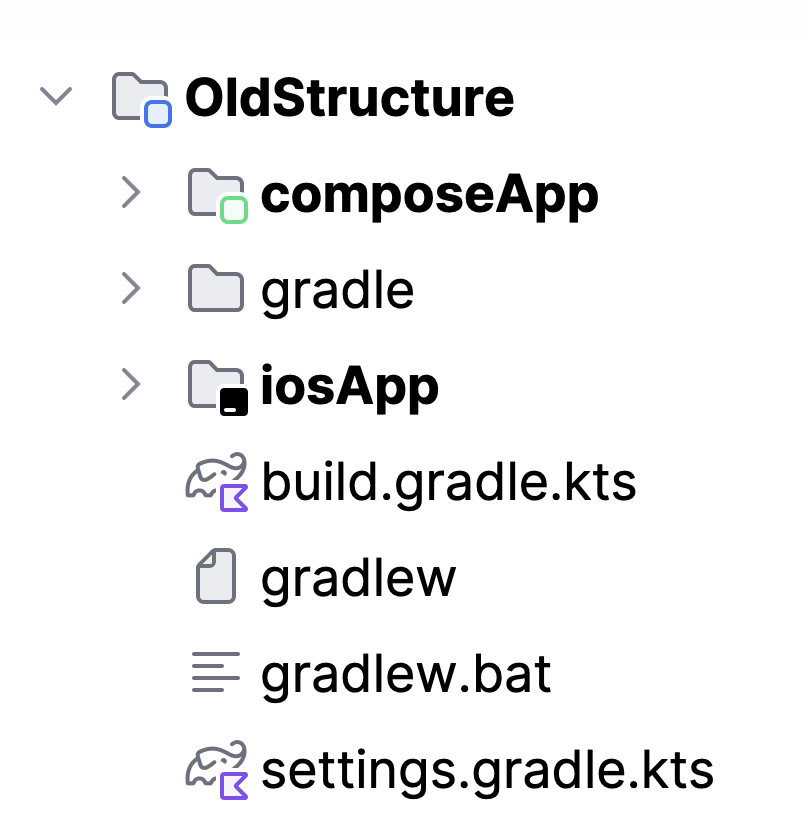
The previous structure relied on a single composeApp module that acted both as a Kotlin Multiplatform library and as the application for multiple platforms. This module contained platform-specific configurations and entry points all in one place. Under the new default, responsibilities are split: a shared module holds the pure KMP library code (business logic, shared UI, etc.), and separate application modules like androidApp, desktopApp, and webApp consume that library and define each platform’s own entry point, packaging, and resources. Existing iOS apps, which were already in an iosApp folder, remain separate. This separation makes the project easier to understand, maintain, and scale, especially when you don’t share UI across all platforms.
2. Why is JetBrains making this structural change?
Several motivations drove this update. First, the old composeApp module had too many responsibilities—it was both a library and every platform’s application. This made the configuration bloated and obscured whether a setting applied to the library or to a specific app. Second, when developers chose not to share UI on a platform (e.g., using SwiftUI for iOS), they needed an extra shared module anyway, creating inconsistency. Third, iOS apps were always in a separate iosApp folder due to Xcode requirements, but other platform apps were embedded inside composeApp, causing asymmetry. Finally, Android Gradle Plugin 9.0 now explicitly forbids applying the com.android.application plugin inside a multiplatform module, forcing the Android entry point to live in its own module. The new structure solves all these issues while aligning with industry conventions used by other build systems and frameworks.
3. How does AGP 9.0 force the separation of Android app code?
Android Gradle Plugin 9.0 enforces a clear separation between library modules and application modules. Specifically, it no longer allows the Android application plugin (com.android.application) to be applied in a Kotlin Multiplatform module. In the old composeApp, the Android target was configured alongside shared code, which violated this rule. To comply, the Android entry point (and its associated packaging, manifest, and resources) must be moved to a dedicated androidApp module that only uses the com.android.application plugin. This change forces the project to adopt the new structure where the KMP library remains a pure library (using com.android.library or none) and the Android app is a consumer of that library. For IntelliJ IDEA compatibility with AGP 9.0, update to version 2026.1.2 or later and use the latest Android plugin.
4. Does this affect how I set up my iOS app (existing or new)?
For iOS, the change is minimal because the old structure already kept the iOS app in a separate iosApp folder. The iOS app remains a standalone Xcode project that consumes the shared KMP library (typically via a framework). In the new default, the shared code is in the shared module, and the iOS app references that module just as it did before—through the embedAndSignAppleFrameworkForXcode task or similar. If you were using the old composeApp with iOS targets, you would have already had an iosApp folder outside composeApp. The new structure simply makes the relationship more explicit: the shared module provides the framework, and each platform (including iOS) has its own application module. No extra work is needed for existing iOS projects beyond aligning the module references.
5. How do I migrate an existing KMP project to the new structure?
Start by creating a new shared module that will contain all your Kotlin Multiplatform library code (commonMain, androidMain, iosMain, etc.). Move the common source sets and platform-specific code (except entry points) from the old composeApp into this new module. Then, for each platform you support, create an application module: androidApp, desktopApp, webApp, and keep your existing iosApp. In these modules, define the platform’s entry point and add a dependency on the shared module. Remove the com.android.application plugin from the old composeApp (if present) and apply only the KMP and Android library plugins there, or simply delete the old module if everything moved. Update your Gradle settings to include the new modules. Finally, adjust any build scripts that referenced composeApp directly. JetBrains provides updated sample projects (e.g., kotlinconf-app, KMP-App-Template, RSS Reader) as reference.
6. What benefits does the new structure offer beyond compliance?
Besides adhering to AGP 9.0 requirements, the new default brings several practical advantages. Clearer separation of concerns means you can easily see what is shared library code versus platform-specific application code, making the project more maintainable and onboarding new developers faster. It reduces configuration complexity—the shared module only needs KMP and library plugins, while each application module contains only its own packaging and entry-point settings. This also improves build speed because modules can be cached independently. The structure aligns with industry standards used by Android, iOS, desktop, and web projects, so developers familiar with those ecosystems will feel at home. Finally, it simplifies future scaling: adding a new platform (e.g., a watchOS app) is as easy as adding a new application module that depends on the same shared library.
7. Where can I see the new structure in action?
JetBrains has already rolled out the new default in the KMP Wizard—both the IDE plugin (with Kotlin Multiplatform plugin installed) and on kmp.jetbrains.com. Any new project created through these tools will use the shared + androidApp / desktopApp / webApp layout. Official documentation and samples are being updated; you can already explore the kotlinconf-app, KMP-App-Template, and RSS Reader examples, which have been migrated to the new model. These repositories are live references for understanding how to structure your own projects and see the benefits of the clear separation. Additionally, the IntelliJ IDEA version 2026.1.2 or newer fully supports AGP 9.0 and the new KMP structure.