How to Spot Verified Artists on Spotify: A Step-by-Step Guide
Introduction
In an era where AI-generated music can mimic real artists, Spotify has introduced a simple way to confirm authenticity: a mint green checkmark on verified artist profiles. This guide walks you through identifying these badges and understanding what they mean for your listening experience. By following these steps, you'll be able to trust that the music you're hearing truly comes from the artist you expect.
What You Need
- A Spotify account (free or premium)
- The Spotify app (mobile, desktop, or web player)
- An internet connection to search and load artist profiles
Step-by-Step Guide
Step 1: Open Spotify
Launch the Spotify application on your preferred device. Log in to your account if you aren't already signed in. The verification badge is available across all platforms, so you can use the mobile app, desktop client, or web browser.
Step 2: Search for an Artist
Use the search function (magnifying glass icon) to type the name of an artist you want to check. As you type, Spotify will suggest matching profiles. Tap or click on the artist's name to go to their profile page. For best results, search for widely known musicians or those you frequently listen to.
Step 3: Look for the Green Checkmark
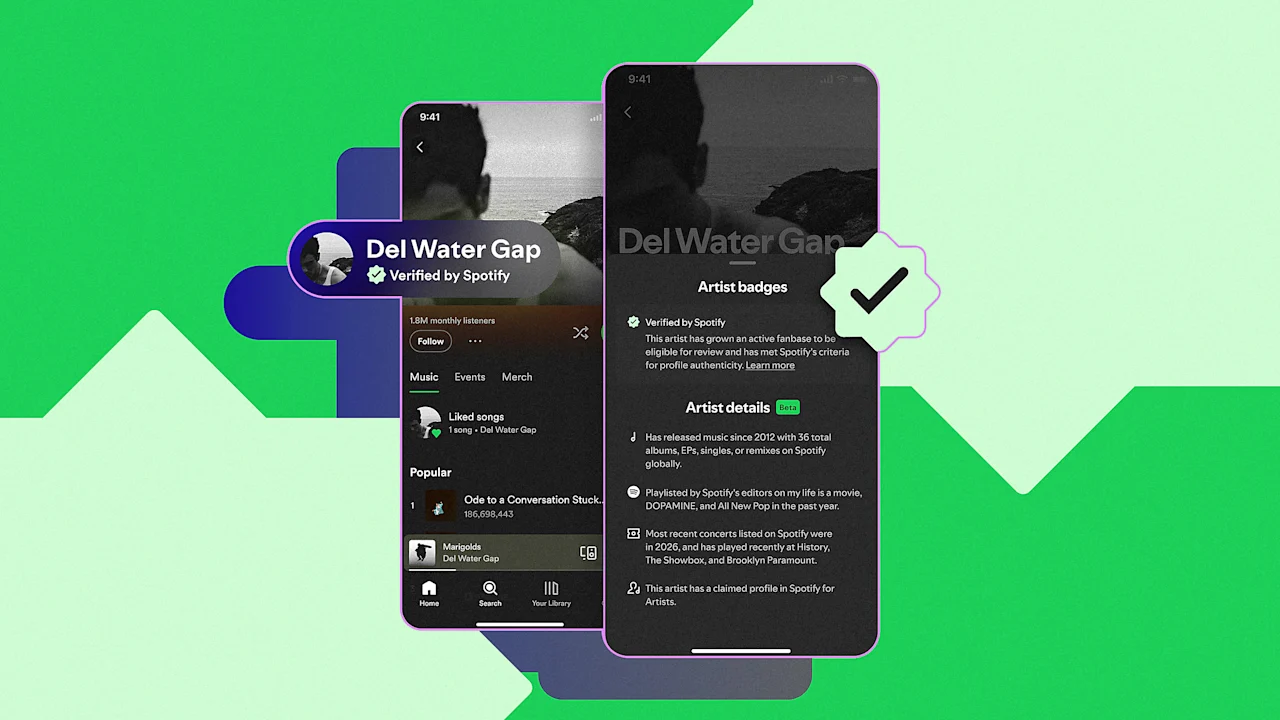
On the artist's profile, scan the area near their name and profile picture. If the profile has been verified by Spotify, you will see a mint green checkmark icon next to the artist's name. This badge indicates that Spotify's human review team has confirmed the profile belongs to the real artist, not an impersonator or AI-generated account.
What if you don't see a check?
Many artists may not yet be verified. According to Spotify, over 99% of artists that listeners actively search for will be verified by the feature's launch on April 30th. However, smaller or less active musicians may still be in the review queue. The absence of a badge doesn't necessarily mean the profile is fake—just that it hasn't passed the verification process yet.
Step 4: Understand Verification Criteria
The green check is not randomly assigned. Spotify evaluates several factors before granting the badge:
- Listener activity: How many people listen to the artist's music and how often.
- Engagement over time: Consistent growth and interaction from fans.
- Identifiable artist presence: The artist must have a clear, verifiable footprint both on and off Spotify (e.g., official social media, website, record label).
These criteria are paired with human review to ensure that only legitimate artists acting in good faith receive the badge. As Spotify states, this isn't just about filtering out bad actors—it's about highlighting authentic artistry.
Step 5: Explore the Artist Details Section
Alongside the verification badge, Spotify is testing a beta section on artist profiles that resembles a nutritional facts panel. This section, available regardless of verification status, displays career milestones, release history, and touring activity. To access it, scroll down on the artist's profile page and look for a tab or button labeled "Artist Details" or similar. This extra layer of transparency helps you understand the artist's journey and verify their legitimacy through concrete data.
Tips for a Safer Listening Experience
- Enable Artist Profile Protection: If you're an artist yourself, consider opting into Artist Profile Protection. This feature adds an extra review step, requiring you to manually authorize new songs before they appear on your profile—preventing AI-generated tracks from being uploaded under your name.
- Beware of AI-generated scams: Cases like the fake Blaze Foley song (the singer died decades ago) show how scammers use AI to produce tracks and claim royalties. Always check the verification badge and listen to an artist's official releases before adding songs to your library.
- Stay updated on Spotify's safeguards: The platform has implemented additional protections against impersonation, including a music spam filter and moves toward AI disclosures in industry credit systems. Keep an eye on Spotify's official blog for the latest updates.
- Trust the badge, but use common sense: While the green check is a strong indicator of authenticity, it's not foolproof. If something feels off—like a sudden style change or suspicious release dates—investigate further before assuming it's genuine.
By following these steps, you can confidently navigate the evolving music landscape, ensuring you're always supporting real human artists. The green check is just one tool in Spotify's expanding arsenal against AI misuse, but it's a visible and reassuring one for listeners.